PostgreSQL continues to dominate modern database workflows. According to the latest Stack Overflow Developer Survey, it remains the most widely used database among developers, with 49% of respondents using it for the second year in a row.
That makes sense. PostgreSQL is flexible enough to handle OLTP workloads, analytics-heavy queries, JSONB-based data models, and complex indexing strategies. And it does all this without forcing teams into a proprietary ecosystem.
The real challenge usually isn’t PostgreSQL itself. It’s the workflow around it. Once you’re dealing with larger schemas, multi-join queries, execution plans, and performance tuning, living entirely in the terminal can start slowing you down.
Fortunately, modern GUI tools with supported SQL AI tools can make this work much easier. The best ones help you move faster with schema-aware SQL generation, smarter autocomplete, visual execution plans, and easier debugging when queries don’t behave the way you expect.
In this guide, we break down the best PostgreSQL GUI tools with AI for 2026 and where each one fits depending on whether you’re writing queries, managing production workloads, or analyzing data.
Table of Contents
- Evaluation criteria for PostgreSQL GUI tools
- Top PostgreSQL GUI tools comparison table
- List of the best PostgreSQL GUIs with AI in 2026
- How to choose the best PostgreSQL GUI with AI
- Takeaway
- FAQ
Evaluation Criteria for PostgreSQL GUI Tools
When evaluating PostgreSQL GUI clients, we didn’t just look at features — we asked key questions to find what truly helps professionals work smarter. Here’s what we needed answered:
- Can it actually generate SQL using AI? Accuracy mattered. We looked for tools that turned prompts into correct, schema-aware queries.
- Does it handle real-world database tasks? We tested it with complex queries, schema edits, and execution plans — no easy shortcuts.
- Are the essential features there? Autocomplete, schema visualization, and performance tools were must-haves.
- Can it handle large, complex datasets? We watched for lag; only tools that stayed fast made the cut.
- Does it boost productivity for pros? We sought tools that genuinely save time for developers, DBAs, and analysts — real productivity gains.
Top PostgreSQL GUI Tools Comparison Table
Based on the evaluation criteria we just covered, this comparison table highlights the best GUI tools for PostgreSQL that stood out. Use it to quickly pinpoint which tool aligns with your workflow.
| Tool | Best for | AI capabilities | SQL Editor & Productivity | Ease of use |
|---|---|---|---|---|
| dbForge Studio for PostgreSQL + AI Assistant | PostgreSQL development, administration, analysis | AI via the integrated dbForge AI Assistant | Advanced editor, profiling, schema comparison, data tools | Structured, PostgreSQL-focused UI |
| JetBrains DataGrip | Cross-database development | AI via JetBrains (AI Free included, AI Pro paid add-on) | Refactoring, autocomplete, query analysis, navigation | Moderate (IDE-style) |
| DBeaver | Multi-database environments | AI support available, but limited in free edition | SQL editor, extensions, ER diagrams | Moderate |
| Navicat for PostgreSQL | Enterprise database management | Built-in AI (latest versions) | Query editor, data modeling, migration tools | Easy |
| TablePlus | Lightweight database access | AI via plugins/integrations | Fast editor, inline editing, schema browsing | Very easy |
| Beekeeper Studio | Modern developer workflows | AI SQL generation (LLMs) | Clean editor, saved queries, exports | Easy |
| DbVisualizer | Stable enterprise querying | Built-in AI (latest versions) | Visual plans, ER diagrams, query tools | Moderate |
| DbGate | Open-source simplicity | Limited AI integrations | Basic editor, data tools | Easy |
Now that you’ve seen the PostgreSQL GUI tools comparison, let’s look closer at the best PostgreSQL GUI clients with AI in 2026, and what makes each one stand out.
List of the Best PostgreSQL GUIs with AI in 2026
In this section, we dive deeper. We’ll break down each PostgreSQL GUI tool, exploring their standout features, AI strengths, ideal use cases, and how they fit into real PostgreSQL workflows.
1. dbForge Studio for PostgreSQL + dbForge AI Assistant
⭐ 4.3/5 (G2)

Company: Devart
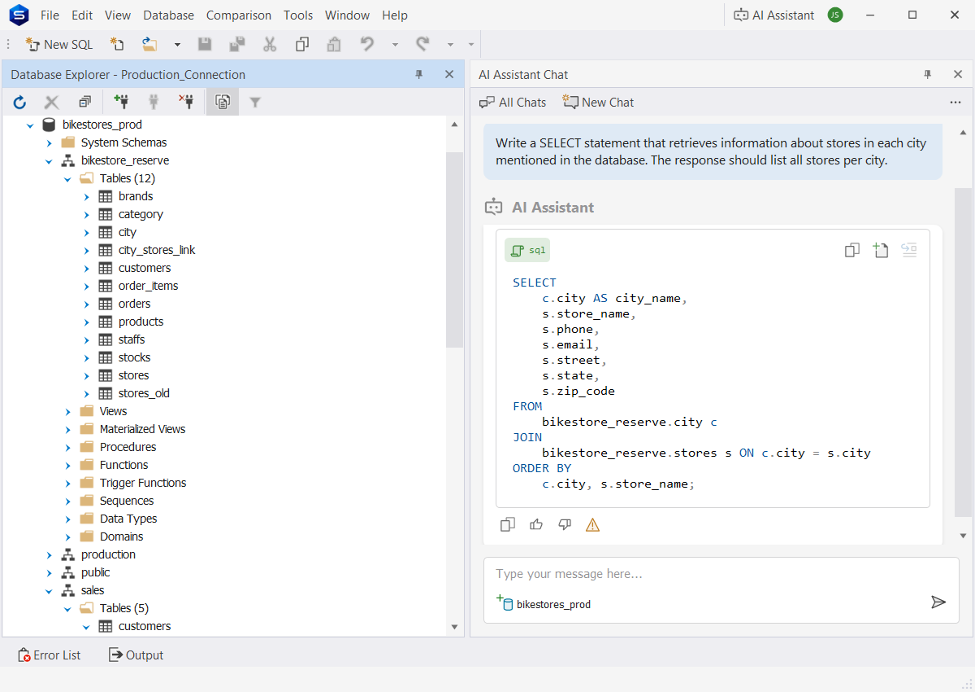
AI capabilities: SQL generation, query explanation, optimization assistance
Supported platforms: Windows-first; macOS and Linux via compatibility solutions (Wine, CrossOver, Parallels)
dbForge Studio for PostgreSQL is a full-featured GUI designed for database development, administration, and analysis. It combines advanced SQL tooling with an integrated AI assistant that helps generate queries, explain logic, and optimize performance.
The platform is built for structured PostgreSQL workflows. Instead of manually writing and debugging queries, users can rely on AI-assisted generation, visual tools, and performance analysis to move faster with fewer errors.
Team and Project Fit
| Scenario | Fit |
|---|---|
| Large, complex PostgreSQL databases | Strong fit |
| Cross-database (multi-DBMS) environments | Limited fit |
| AI-assisted SQL generation and optimization | Strong fit |
| Ease of use for beginners | Moderate fit |
| Rapid, lightweight query tasks | Less suitable |
Key Features
- AI-powered SQL generation and query explanation.
- Query profiler with execution plan analysis.
- Data & schema comparison and synchronization.
- Data import/export from/to 10+ file formats.
- Advanced SQL editor with autocomplete and formatting.
- Support for PostgreSQL on-premises and cloud services (Amazon Redshift, RDS, Aurora; Google Cloud; Azure Database; Supabase, etc.).
Pros
- Strong PostgreSQL-focused feature set.
- Built-in AI assistant improves query workflows.
- Structured interface for complex database work.
Cons
- Windows-first environment.
- Steeper learning curve for beginners.
Pricing
Free Express Edition available. Paid plans start at $89.95/year.
2. JetBrains DataGrip
⭐ 4.6/5 (G2)

Company: JetBrains
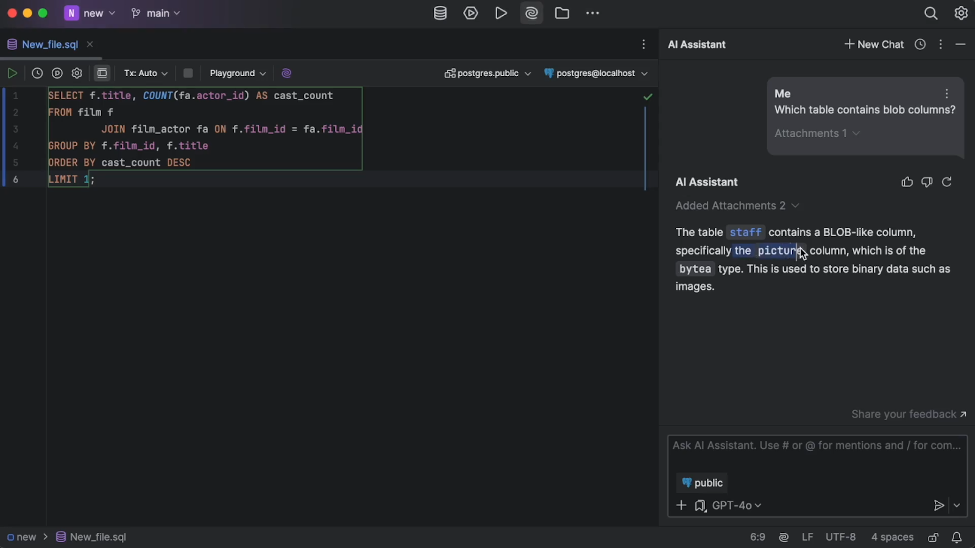
AI capabilities: Query generation, explanation (via JetBrains AI)
Supported platforms: Windows, macOS, Linux
DataGrip is a professional SQL IDE built for developers working across multiple databases. It focuses on productivity — offering a powerful SQL editor, deep schema navigation, and intelligent refactoring tools.
It’s not PostgreSQL-specific, but that’s the point. DataGrip fits environments where teams switch between databases and need one consistent interface. AI features come through JetBrains AI, helping generate and explain queries, though they’re not as deeply integrated into PostgreSQL workflows as dedicated tools.
Team and Project Fit
| Scenario | Fit |
|---|---|
| Large, complex PostgreSQL databases | Strong fit |
| Cross-database (multi-DBMS) environments | Strong fit |
| AI-assisted SQL generation and optimization | Moderate fit |
| Ease of use for beginners | Moderate fit |
| Rapid, lightweight query tasks | Moderate fit |
Key Features
- Smart SQL editor with context-aware autocomplete.
- Query analysis, profiling, and refactoring tools.
- Unified interface for multiple databases.
- Schema navigation and dependency tracking.
- AI assistance via JetBrains AI plugin.
Pros
- Excellent for cross-database workflows.
- Powerful SQL editor with deep refactoring support.
- Strong integration with the JetBrains ecosystem.
- Consistent experience across environments.
Cons
- Basic AI features are included, but advanced AI capabilities require a subscription.
- Not optimized specifically for PostgreSQL workflows.
- The interface may feel complex for new users.
Pricing
Free for non-commercial use. Paid plans start at $10.90/month ($109/year) for individuals, from $25.90/month ($259/year) for organizations.
3. DBeaver
⭐ 4.4/5 (G2)

Company: DBeaver Corp
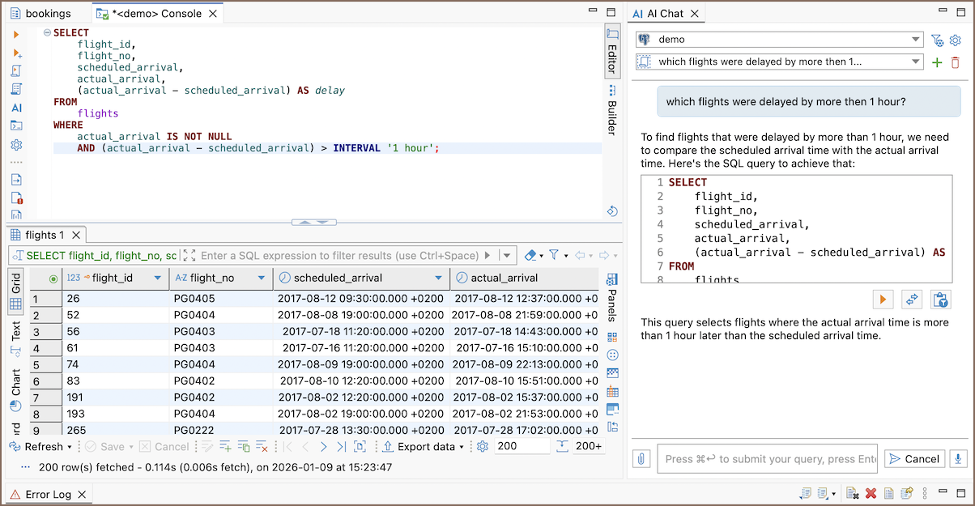
AI capabilities: AI available in free edition, but limited compared to paid editions
Supported platforms: Windows, macOS, Linux
DBeaver is one of the most widely used PostgreSQL GUI tools, known for its flexibility and strong free Community Edition. It supports over 100 databases, making it a go-to choice for teams managing mixed environments.
The Community version covers most core workflows, while the Pro edition adds AI assistance and advanced features. This makes DBeaver a practical option for teams that want broad database support first, and AI as an upgrade rather than a core dependency.
Team and Project Fit
| Scenario | Fit |
|---|---|
| Large, complex PostgreSQL databases | Moderate fit |
| Cross-database (multi-DBMS) environments | Strong fit |
| AI-assisted SQL generation and optimization | Moderate fit |
| Ease of use for beginners | Moderate fit |
| Rapid, lightweight query tasks | Strong fit |
Key Features
- Cross-platform support (Windows, macOS, Linux).
- SQL editor with autocomplete and query execution tools.
- Visual ER diagrams and data modeling tools.
- Multi-database connectivity across 100+ systems.
- Extensions and plugin support for added functionality.
Pros
- Strong free Community Edition.
- Excellent multi-database support.
- Flexible and extensible through plugins.
- Active community and regular updates.
Cons
- The interface can feel cluttered with many features.
- AI capabilities are limited in the free version.
- Performance may slow with very large datasets.
Pricing
Free Community Edition available. Pro version starts at $12/month ($113/year) per license.
4. Navicat
⭐ 4.4/5 (G2)

Company: PremiumSoft
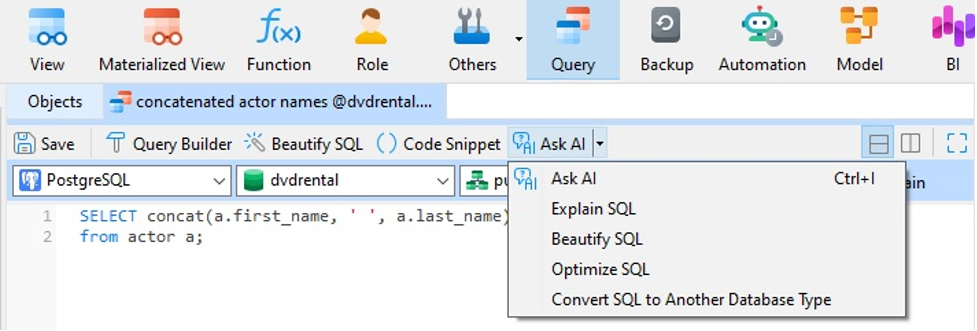
AI capabilities: AI-assisted query generation and automation (recent versions)
Supported platforms: Windows, macOS, Linux
Navicat is a premium PostgreSQL GUI focused on usability and enterprise-grade database management. It combines a polished interface with strong tooling for data modeling, administration, and reporting.
It’s designed for teams that want an all-in-one environment without a steep learning curve. Recent versions introduce AI-assisted query building and automation, though the AI features are still evolving compared to more deeply integrated solutions.
Team and Project Fit
| Scenario | Fit |
|---|---|
| Large, complex PostgreSQL databases | Strong fit |
| Cross-database (multi-DBMS) environments | Strong fit |
| AI-assisted SQL generation and optimization | Moderate fit |
| Ease of use for beginners | Strong fit |
| Rapid, lightweight query tasks | Moderate fit |
Key Features
- SQL editor with syntax highlighting, code completion, and query builder.
- Visual database modeling and schema design tools.
- Data migration, synchronization, and data generation tools.
- BI dashboards and data visualization features.
- Import/export support for CSV, JSON, XML, Excel, and more.
- Team collaboration through Navicat Cloud.
- AI assistant for SQL generation, optimization, error fixing, and query explanation.
Pros
- Clean, intuitive interface with low learning curve.
- Strong data modeling and administration tools.
- Supports multiple database systems.
- Reliable for enterprise workflows.
Cons
- High pricing compared to alternatives.
- AI features not as advanced or deeply integrated.
- Some advanced features locked behind higher tiers.
Pricing
No full free version. Pricing starts at $14.99/month, with higher-tier licenses up to $449 one-time per license, depending on edition.
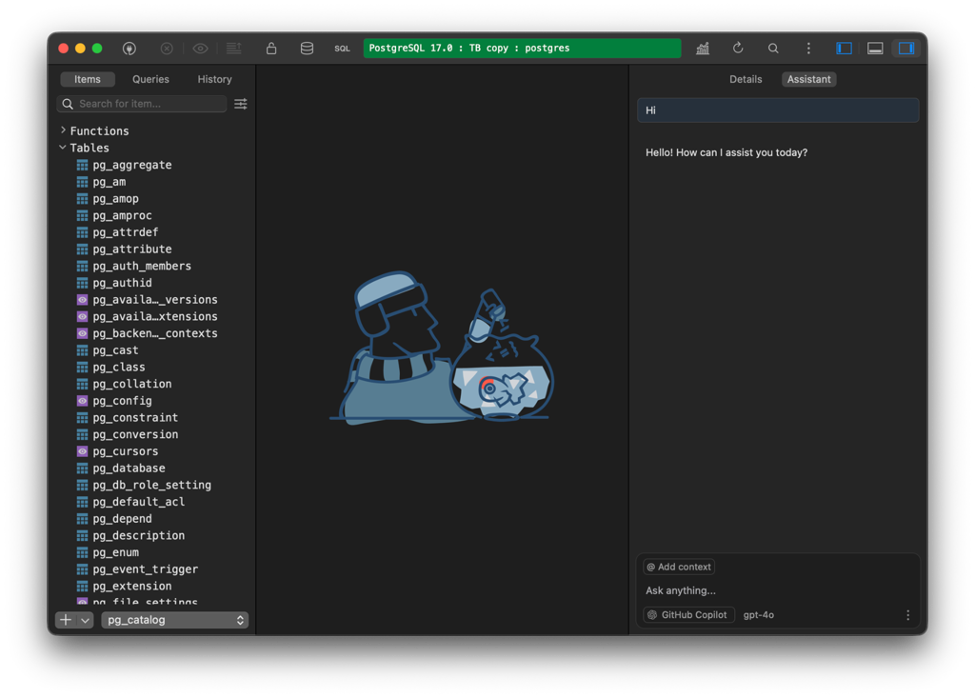
5. TablePlus
⭐ 4.5/5 (G2)

Company: TablePlus Inc.
AI capabilities: Available via external integrations (LLM Plugin)
Supported platforms: macOS, Windows, Linux
TablePlus is a lightweight PostgreSQL GUI built for speed and simplicity. It strips away heavy tooling and focuses on fast query execution, a clean interface, and smooth day-to-day workflows.
It’s designed for developers who want minimal friction. Instead of deeply integrated AI, TablePlus relies on external integrations, making it less suitable for AI-driven workflows but strong for fast, focused querying.
Team and Project Fit
| Scenario | Fit |
|---|---|
| Large, complex PostgreSQL databases | Moderate fit |
| Cross-database (multi-DBMS) environments | Strong fit |
| AI-assisted SQL generation and optimization | Limited fit |
| Ease of use for beginners | Strong fit |
| Rapid, lightweight query tasks | Strong fit |
Key Features
- Fast query execution with minimal overhead.
- Clean, native UI optimized for performance.
- Multi-database support (PostgreSQL, MySQL, SQLite, and more).
- Inline data editing and export tools.
- Tab-based interface for managing multiple connections.
Pros
- Extremely fast and responsive.
- Simple, intuitive interface.
- Ideal for quick queries and lightweight workflows.
- Low setup time and easy onboarding.
Cons
- AI assistant available only via plugin.
- Limited advanced tooling for complex database management.
- Fewer enterprise-level features compared to heavier GUIs.
Pricing
Free version available with limitations. Paid license starts at $99 per license (one-time purchase).
6. Beekeeper Studio
⭐ 4.3/5 (G2)

Company: Beekeeper Studio Inc.
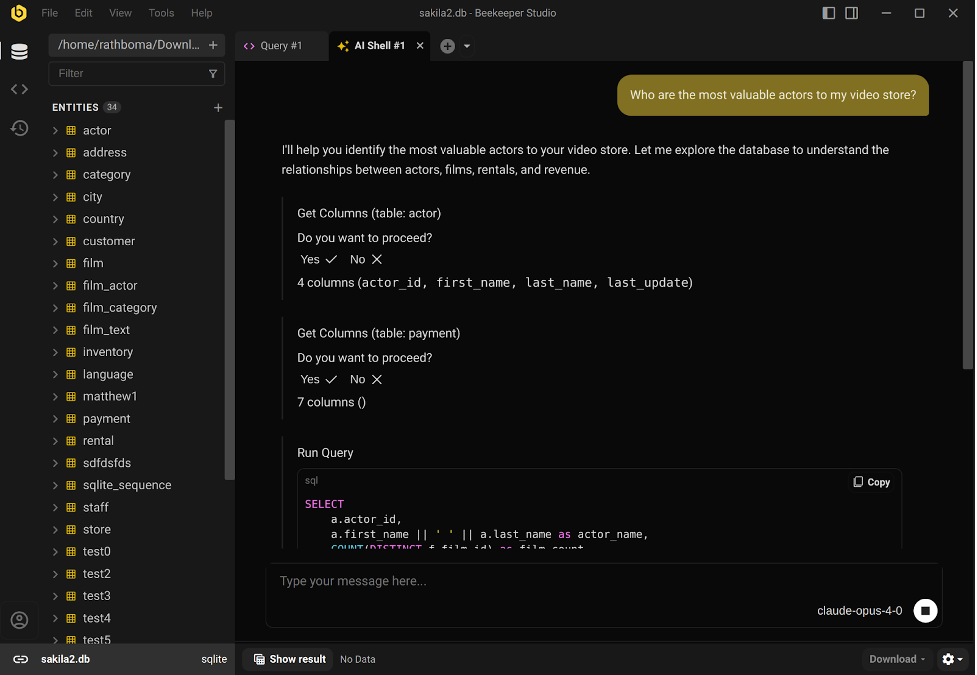
AI capabilities: AI Shell with natural language SQL generation (GPT, Claude, Gemini), schema-aware assistance
Supported platforms: Windows, macOS, Linux
Beekeeper Studio is a modern PostgreSQL GUI built around an AI-first workflow. Its standout feature is the AI Shell, which lets users generate SQL queries from natural language prompts using models like GPT-5, Claude, Gemini, and local LLMs.
What makes it different is context awareness. The AI can reference your database schema, which improves accuracy when generating queries and reduces the need for manual corrections. Combined with a clean interface, it creates a faster, more intuitive way to work with PostgreSQL.
Team and Project Fit
| Scenario | Fit |
|---|---|
| Large, complex PostgreSQL databases | Moderate fit |
| Cross-database (multi-DBMS) environments | Moderate fit |
| AI-assisted SQL generation and optimization | Strong fit |
| Ease of use for beginners | Strong fit |
| Rapid, lightweight query tasks | Strong fit |
Key Features
- AI Shell for natural language SQL generation.
- Schema-aware query generation using LLMs.
- Clean, modern interface with minimal clutter.
- Multi-table export and CSV import tools.
- Cross-platform support.
Pros
- Strong AI capabilities with schema context awareness.
- Clean and intuitive user experience.
- Fast setup and easy onboarding.
- Actively evolving with modern features.
Cons
- Less mature than long-established tools.
- Advanced database administration features are limited.
- AI features may depend on external model configuration.
Pricing
Free version available. Paid plans start at $18/month ($108/year per user).
7. DbVisualizer
⭐ 4.6/5 (G2)

Company: DbVis Software
AI capabilities: AI assistant for SQL generation, query explanations, and troubleshooting
Supported platforms: Windows, macOS, Linux
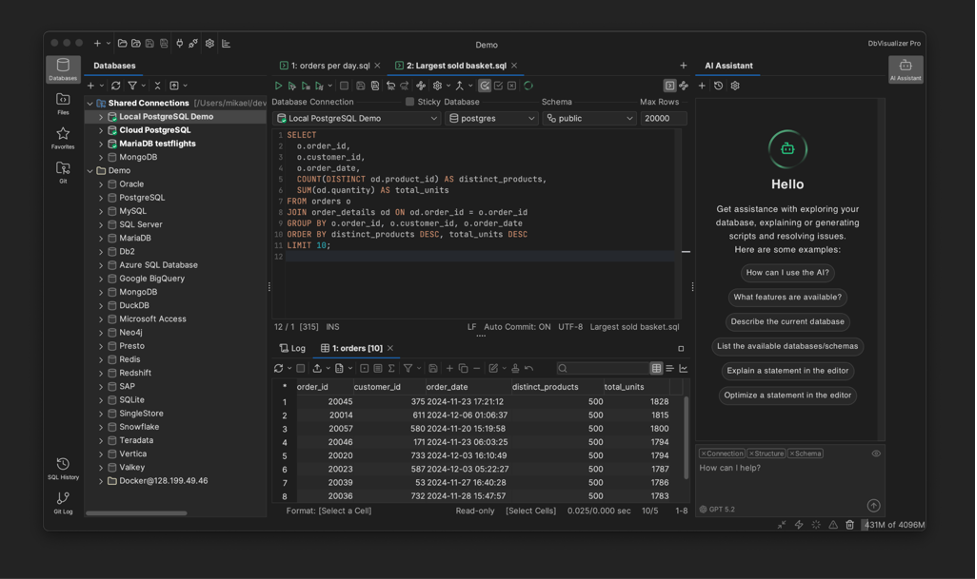
DbVisualizer is a universal database GUI designed for developers and database teams working across multiple database systems. It supports PostgreSQL as well as many other databases through JDBC connectivity, making it a strong option for teams operating in mixed database environments.
Recent versions also introduce an integrated AI assistant that can help generate SQL queries, explain query logic, and troubleshoot database issues directly inside the interface. Combined with strong cross-database support and consistent performance across platforms, DbVisualizer is widely used in professional database workflows.
Team and Project Fit
| Scenario | Fit |
|---|---|
| Large, complex PostgreSQL databases | Strong fit |
| Cross-database (multi-DBMS) environments | Strong fit |
| AI-assisted SQL generation and optimization | Moderate fit |
| Ease of use for beginners | Moderate fit |
| Rapid, lightweight query tasks | Moderate fit |
Key Features
- AI assistant for SQL generation and query explanations.
- Advanced SQL editor with autocomplete and formatting.
- Visual query builder and schema navigation.
- Execution plan visualization and query analysis tools.
- Cross-database connectivity via JDBC drivers.
Pros
- Strong cross-database support.
- Stable and mature database client.
- Visual tools for exploring schemas and queries.
- AI assistant helps generate and explain SQL.
Cons
- The interface can feel heavier than lightweight GUIs.
- AI capabilities are newer compared to AI-first tools.
- Some advanced features available only in the Pro edition.
Pricing
Free edition available. Pro plans start at $199 per user (one-time purchase).
8. DbGate
⭐ 4.7/5 (G2)

Company: DbGate (developed by the DbGate team and open-source contributors)
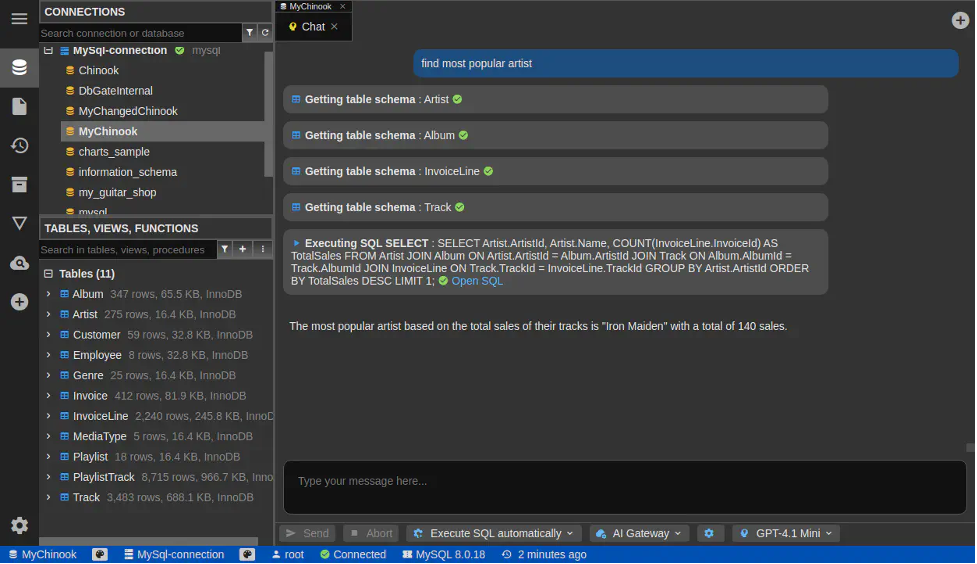
AI capabilities: AI-powered Database Chat — understands schema and data, generates SQL, executes queries with user approval
Supported platforms: Windows, macOS, Linux (desktop and web versions available)
DbGate is a cross-platform database GUI designed to provide a simple and flexible way to manage databases. It supports PostgreSQL alongside many other SQL and NoSQL databases, allowing developers to work with multiple data sources from a single interface.
The platform focuses on practical database workflows such as data browsing, query editing, schema exploration, and data visualization. DbGate includes Database Chat — an AI-powered assistant that understands database schema and data, generates SQL queries from natural language prompts, and helps retrieve results through a conversational interface.
With its combination of lightweight design, cross-database compatibility, and built-in visualization and automation tools, DbGate works well for developers who need a flexible GUI without the complexity of larger enterprise database IDEs.
Team and Project Fit
| Scenario | Fit |
|---|---|
| Large, complex PostgreSQL databases | Moderate fit |
| Cross-database (multi-DBMS) environments | Strong fit |
| AI-assisted SQL generation and optimization | Moderate fit |
| Ease of use for beginners | Strong fit |
| Rapid, lightweight query tasks | Strong fit |
Key Features
- Data browser and editor with filtering and relational navigation.
- Query editor with autocomplete, formatting, and query history.
- AI Database Chat for natural-language SQL generation.
- Import/export tools supporting SQL, CSV, JSON, Excel, and other formats.
- Data visualization with ER diagrams, charts, and maps.
- Schema comparison and synchronization tools.
Pros
- Free open-source Community edition available.
- Cross-platform desktop and web deployment.
- Supports multiple database engines in a single interface.
- Built-in AI assistant for schema-aware SQL generation.
Cons
- Some advanced features available only in Premium editions.
- Smaller ecosystem compared to long-established tools.
- Enterprise administration features mainly available in Team editions.
Pricing
Free Community edition available. Premium starts at $12/month ($120/year) for individuals, $15/user/month ($150/year) for teams.
With the tools covered in detail, the next step is choosing the right one. The differences matter more when viewed through your workflow, team setup, and long-term needs.
How to Choose the Best PostgreSQL GUI with AI
Choosing the right PostgreSQL GUI comes down to how you actually work. The best tool is not the one with the most features, but the one that fits your role, workload, and how much you rely on AI.
Role-based Requirements (Developers, DBAs, Analysts)
Start with your role. That alone narrows the field.
If your work is SQL-heavy (writing queries, debugging logic, building features), tools like dbForge Studio and DataGrip will feel more natural. They’re built around developer workflows.
If you’re managing databases in production, monitoring performance, or handling users and backups, tools like Navicat or DbVisualizer offer more control and stability.
For analysts, the priority shifts toward exploring data quickly. In that case, ease of use and clean data access matter more than deep administrative features.
AI Capabilities and Intelligence Depth
Not all AI will save you time. Some tools only suggest snippets. Others actually take work off your plate. The real question is: does the AI understand your schema, or is it guessing?
Tools like dbForge AI Assistant and Beekeeper Studio stand out because they generate queries based on your actual database structure. That reduces rework and makes the output usable faster. If AI is central to your workflow, this is where you should look closely.
SQL Editor and Productivity Features
Even with AI, most work still happens in the SQL editor. That’s where productivity is won or lost.
The best GUI for PostgreSQL should help you move faster, not slow you down. Look for autocomplete that understands context, clear formatting, and tools that show how queries actually run.
Execution plans and profiling are especially important when performance matters. Without them, optimization becomes guesswork.
Platform Compatibility (Windows, macOS, Linux)
Compatibility is usually not the issue — experience is. Some tools feel faster and more stable on certain platforms. For example, TablePlus offers a smoother experience on macOS, while tools like DBeaver prioritize flexibility across systems.
If your team works across different environments, consistency matters more than having the same feature set everywhere.
Performance, Stability, and Scalability
This becomes critical as your data grows. Lightweight tools are great for quick queries, but they may struggle with large datasets or complex schemas. On the other hand, tools like dbForge Studio and DbVisualizer are built to handle heavier workloads reliably.
If you’re working in production or dealing with large volumes of data, stability should outweigh convenience.
Pricing, Licensing, and Long-term Value
Finally, think beyond the initial cost. Free tools like DBeaver Community and DbGate are strong starting points. But as requirements grow, limitations show up — especially around performance, support, and AI.
Subscription tools like DataGrip and Navicat spread costs over time, while TablePlus offers a one-time license. The better question is not “what’s cheaper?” but “what will still work for us in a year?”
Takeaway
Modern PostgreSQL GUI tools with AI significantly improve how databases are managed. They reduce the time spent writing SQL, simplify schema exploration, and help optimize performance through intelligent assistance.
The right tool depends on your workflow. Developers may prioritize speed and AI assistance, while DBAs focus on stability and control.
dbForge Studio for PostgreSQL stands out as a leading solution. Its combination of advanced AI capabilities, deep PostgreSQL integration, and professional-grade tools makes it a strong choice for serious database work.
If improving productivity and reducing manual effort is the goal, trying a modern AI-powered PostgreSQL GUI is no longer optional — it’s a competitive advantage.
FAQ
What features should I look for in the best PostgreSQL GUI client?
The best PostgreSQL GUI should include a strong SQL editor with autocomplete, query profiling, and execution plan visualization. The best PostgreSQL GUI tools also offer schema visualization, data editing, and performance monitoring. If AI is important, choose a PostgreSQL GUI that can generate and explain queries based on your schema.
Which PostgreSQL GUI tools are best for managing large production databases?
The best PostgreSQL GUI tools for large production environments are those built for stability and performance. Tools like dbForge Studio for PostgreSQL and DbVisualizer stand out among PostgreSQL GUI applications for handling complex schemas, large datasets, and long-running queries reliably.
Can PostgreSQL GUI tools help optimize and troubleshoot SQL queries automatically?
Yes, modern GUI tools for PostgreSQL include built-in optimization features. Many PostgreSQL GUI tools provide execution plans, query profiling, and AI-assisted suggestions, helping you identify performance issues and optimize queries faster.
Which PostgreSQL GUI tools are best for beginners and non-technical users?
The best PostgreSQL GUI for beginners is one that prioritizes simplicity and usability. Tools like TablePlus, Beekeeper Studio, and DBeaver are considered some of the best PostgreSQL GUI applications for new users because of their clean interfaces and ease of use. If you’re on macOS, tools like TablePlus are often recommended as the best GUI for PostgreSQL Mac tool users.